Search
English
All Categories
    Menu Close

    WWSSDEMO70A8-AA-31#003

    Eval Kit for TFT 7" 1024x600, CAN Bus interface with CUSTOMIZABLE CAN ID & GPIO Support, 32MB Flash Memory, 450cd/m², Wide View Angle (IPS), Capacitive touch panel (GG) (Optimized PCB Design)
    Manufacturer: Winstar
    SKU: WWSSDEMO70A8-AA-31#003

    Accessory kit

    Availability: In stock
    €205.80 excl tax
    i h

    DESCRIPTION

        Link to 'SMART GUI BUILDER' INTRODUCTION & VIDEO

    WL0F0007000A8GAADSA05-FC is a 7 inch Smart Display CAN series TFT which is defined as a slave device, that is controlled by master device via CAN bus command to render display content on the display screen and return touch event data with protocol objects. WL0F0007000A8GAADSA05-FC is integrated with a standard TFT module WF70-1024600A8L#BP3-FC and 4-layers PCBA with built-in firmware. This 7 inch Smart Display CAN series TFT is an easy-to-use product which allows customers to develop projects rapidly in cost-effective way. This 7" Smart Display can use computer with USB2CAN dongle, MCU or Raspberry Pi interface (PiCAN2) as HOST platform.

    Smart Display products are designed with STMicroelectronics' (ST) controller which supports ST development tools like TouchGFX and STM32CubeIDE. You can also use ST tools to design WINSTAR Smart Display modules besides GUI builder.

    • TouchGFX: An advanced free-of-charge graphic software framework optimized for STM32 microcontrollers.
    • STM32CubeIDE: An advanced C/C++ development platform with peripheral configuration, code generation, code compilation, and debug features for STM32 microcontrollers and microprocessors.
    • STM32CubeMX: A graphical tool that allows a very easy configuration of STM32 microcontrollers, as well as the generation of the corresponding initialization C code for the Arm® Cortex®-M core or a partial Linux® Device Tree for Arm® Cortex®-A core, through a step-by-step process.
    • STM32CubeProg: An all-in-one multi-OS software tool for programming STM32 products. It provides an easy-to-use and efficient environment for reading, writing and verifying device memory through both the debug interface (JTAG and SWD) and the bootloader interface (UART, USB DFU, I2C, SPI, and CAN).

    Below are the features of 7 inch smart display:

    • +12V power supply input with 8V to 35V dynamic range power input, the power consumption is around 6 Watt.
    • Self testing after booting function.
    • CAN bus communication interface.
    • Supports Custom CAN ID protocol, default baud rate at 250Kbps.
    • Built in 32MB external flash memory to store the font and Object Dictionary Data.
    • Supports projected capacitive touch screen (PCAP).
    • Embedded buzzer controlled by Master Device.
    • HOST can be used on multiple platforms, such as Computer (with USB to CAN Dongle), MCU, Raspberry Pi (with PiCAN2).
    • GPIO PIN support with 3.3V TTL, max 5.5V tolerance
    • Design the UI without writing a line of code by Winstar GUI builder! (►Link to GUI Builder Introduction)
    • Designed with STM32F series MCU and Support STMicroelectronics' (ST) software development tools.


    DRAWING

    SPECIFICATIONS

    General Specifications

    ItemStandard ValueUnit
    Operating voltage 8~35 Vdc
    Communication Interface CAN bus --
    MCU STM32F746 N/A
    Flash Memory 32 MB
    SDRAM Frequency 100 MHz
    LCD display size 7 inch
    Dot Matrix 1024 x RGB x 600(TFT) dot
    Module dimension 184.1(W) x 103.8(H) x 22(D) mm
    Active area 154.2144 x 85.92 mm
    Dot pitch 0.1506 x 0.1432 mm
    Brightness Min: 400; Typ: 450 cd/m2
    LCD type TFT, Normally Black, Transmissive
    View Direction 85/85/85/85(IPS)
    Aspect Ratio 16:9
    Touch Panel Projected Capacitive Touch Screen, PCAP
    Surface Glare


    Absolute Maximum Ratings

    ItemSymbolMinTypMaxUnit
    Operating Temperature TOP -20 - +70 ℃
    Storage Temperature TST -30 - +80 ℃


    Electrical Characteristics

    ItemSymbolConditionMinTypMaxUnit
    Supply Voltage VCI - 8 12 35 V
    Supply Current I(mA) - - 680 - mA


    BOM

    ItemDescription
    LCM WF70-1024600A8L#BP3-FC
    PCBA SV10007R00A8C00N0107


    Interface Pin Function

    CON2 definition:

    PinSymbolFunctionRemark
    1 VIN Power supply VIN Power
    2 GND Power supply GND input GND
    3 CAN_H CAN bus D+ I/O
    4 CAN_L CAN bus D- I/O
    5   GND Power supply GND input Input
    6 GND Power supply GND input Input
    7 Reserve __ _
    8 Reserve __ _
    9 VBUS _ _
    10 Reserve _ _
    11 Reserve _ _
    12 GND GND GND
    13 Reserve _ _
    14 Reserve _ _
    15 Reserve _ _
    16 GND GND GND
     

    CON3 definition:

    PinSymbolFunctionRemark
    1 +3V3 3.3V power for SWD interface _
    2 SWCLK CLK pin for SWD interface Input
    3 GND GND for SWD interface _
    4 SWDIO Data pin for SWD interface I/O
    5 NRST Reset pin for SWD interface Input
    6 GND Power  GND _
    7 IO_8 (PA0) for system Resume from suspend Input
    8 BOOT0 Lo: Internal flash boot (Default)
    Hi: External flash boot
    Input
    9 IO_0 (PA5),I/O @3.3V ADC,DAC,Timer, Event,I/O
    10 IO_1 (PA6),I/O @3.3V ADC,Timer, Event,I/O
    11 IO_2 (PA7),I/O @3.3V ADC,Timer, Event,I/O
    12 IO_3 (PA8),I/O @3.3V RST, Timer, Event,I/O
    13 IO_4 (PC13),I/O @3.3V RST, RTC TAMP1, SYS_WKUP,Event,I/O
    14 IO_5 (PB11),I/O @3.3V ADC,Timer, Event,I/O
    15 IO_6 (PA15),I/O @3.3V RST, Timer, Event,I/O
    16 IO_7 (PD11),I/O @3.3V RST, ADC, Event,I/O


    Display Usage

    Functional description

    Smart Display can be used to display the coordinate, status and data information provided by the connected HOST device. Customers can configure the position coordinates they want to display in normal operation mode.

    The Display is designed to be easily connected to a controller network, and to use the register type of Holding Register

    Splash Screen

    The default splash image is shown below.

    This product is produced as a generic product. If you require a custom splash image for your application, contact us to discuss.

    Acquisition of Displayed Data

    Smart Display uses the Modbus protocol to get and send the data.

    On Config mode, customers can set the coordinates or type of objects; On Display mode, customers can send and get data of objects.

    Configuring the Display

    Winstar Smart Display RS-485 series offers an out-of-the-box Modbus development experience that will lower customers' development costs and speed time-to-market expectations.

    The Smart Display can use wide-temperature are designed to support control applications in harsh operating conditions, which designed to be connected to a variety of different situation combinations, such as automotive, marine, power generation and oil-and-gas.

    The Smart Display can use wide-temperature are designed to support control applications in harsh operating conditions, which designed to be connected to a variety of different situation combinations, such as automotive, marine, power generation and oil-and-gas.

    The Smart Display comes with standard UI objects to get customers project off the ground quickly. If customers need custom UI objects support, our engineers are here to help. Send over your contents in PNG/JPG format, we will send over a new set of UI objects within 3~5 working days

    The Smart Display is defined as a slave device, which is controlled by master device via RS-485 command to render display content on the display screen and return touch event data with protocol objects.

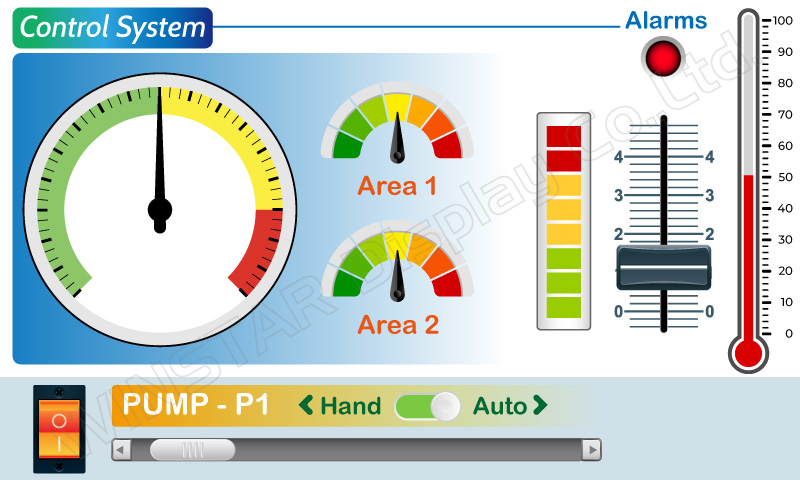
    Example Screen Layout (Industry application)

    The screen layout described in this section is intended to demonstrate the settings of screen items that can be used in a industry application situation.
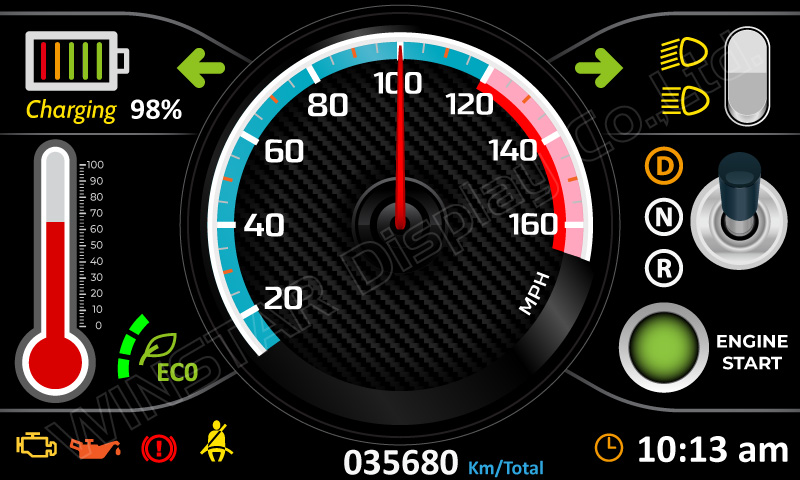
    Example Screen Layout (Vehicle automotive)

    The screen layout described in this section is intended to demonstrate the settings of screen items that can be used in a vehicle automotive situation.
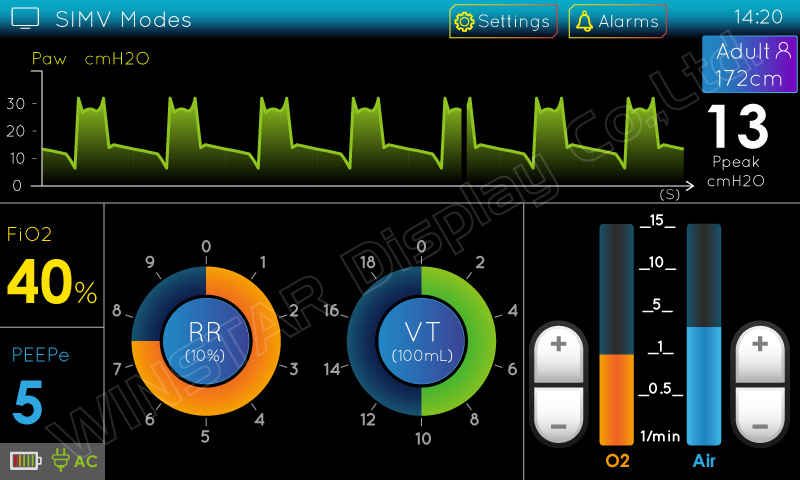
    Example Screen Layout (Medical application)

    The screen layout described in this section is intended to demonstrate the settings of screen items that can be used in a Medical application situation.
    EVALUATION KIT 

    Evaluation Kit P/N WWSSDEMO70A8-AA-31#003 available at the links:

    ITA: https://www.first-components.com/it/wwssdemo70a8-aa-31003

    ENG: https://www.first-components.com/en/wwssdemo70a8-aa-31003

    Products specifications
    Size 7"
    Resolution 1024x600
    Active Area (mm) 154.21x85.92
    Color Full Color
    Power supply 12V
    Display Interface CAN Bus + GPIO
    View Angle IPS
    Frame Yes
    Touch Panel Capacitive
    O. Temperature (°C) -20~70
    Preferred - Not Preferred Preferred
    *
    *
    *
    *
    Only registered users can write reviews
